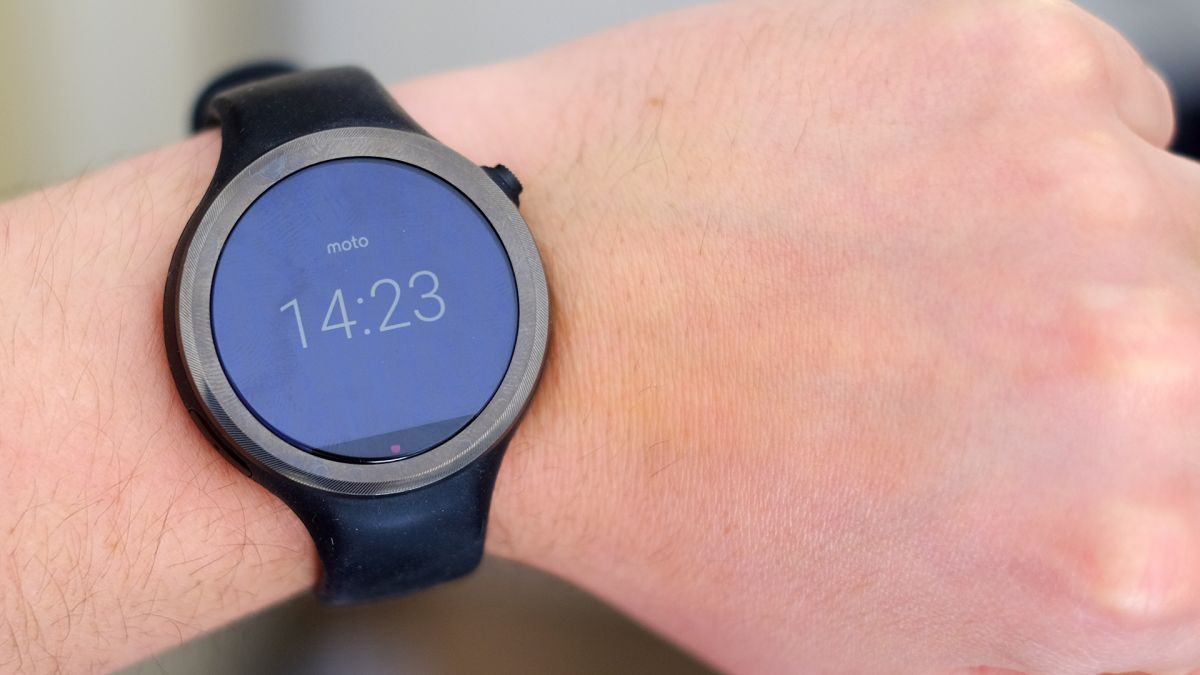
The Moto 360 Sport looks like a 'sporty' version of the Moto 360 (2015), but it's much more than that. This is only the second Android Wear watch to have GPS, and the tech is much better implemented than it was in the first, the Sony Smartwatch 3.
It also has a new kind of screen – and it's one that we're likely to see plenty of others emulate in the future because it works so well on a smartwatch, with its style changing depending on how bright the conditions are.
The Moto 360 Sport costs £219/US$299 (around AU$359), right where you'd expect a high-end Android Wear smartwatch to land.
Since release in the US the company has also dropped the price of the Moto 360 Sport down to US$199, but it's still a lot of money to spend on wristwear. Does it feel high-end enough to justify that price tag?
Design and features
Motorola's smartwatches are usually very pretty, style-oriented things. At launch the original Moto 360 seemed an almost sci-fi take on the smartwatch, while the Moto 360 (2015) brought it into the present with a more practical – frankly more normal – yet still stunning look.
The Moto 360 Sport is different, though. While the round screen and dimensions are comparable to its predecessors, this watch looks plainer and more ordinary.
It has a chunky rubber strap built in, and you can't swap it for something sleeker or slimmer; the design inspiration is less Cartier, more Tom Tom Runner. There's nothing wrong with that when this is meant to be a smartwatch/runner's watch hybrid, but the strap design could be a bit smarter.
Motorola has peppered the strap with ventilation holes, but the silicone used doesn't feel anywhere near as nice as that used in, for example, the Garmin Fenix 3. This is higher-friction material, with a more rubbery feel; it's not flat-out uncomfortable, but it picks up a lot of dust and dirt, and causes undue marks and sweating on my wrist when it's done up as tightly as it needs to be for the heart rate sensor to work.
You can tell that Motorola hasn't been working with rubber watch strap designs for as long as more established sports watch makers – but it's not as comfortable as the Moto 360 (2015) either.
The Moto 360 Sport is certified to IP67 standard, meaning you can wear it in the shower – I have, and it's still working. However Motorola says it's not meant to be used while swimming.
To quote the Motorola website: "Withstands immersion in up to 3 feet of fresh water for up to 30 minutes. Not designed to work while submerged underwater. Do not use while swimming, or subject it to pressurized streams of water."
If there's a major design win for the Moto 360 Sport it's that it doesn't attract too much attention. Wearing the Sony SmartWatch 3 earned me flat-out ridicule from friends, while this device barely got a reaction at all. People are more accustomed to smartwatches these days, sure, but this is also a pleasantly innocuous visual design.
The two slightly awkward features of the design are only noticeable on closer inspection. First, there's a plastic cut-out in the rubbery side, which is where the mic lives, and second, Motorola still uses the same 'flat tire' screen style as on other Moto watches.
This looks pretty bad if you're flicking through Android Wear's white-background apps menu, or if you use a white clock display, but in other respects the screen is unusually good.
Display
The Moto 360 Sport has what Motorola calls an AnyLight display, and it's pretty clever. This looks like a normal LCD display when you're actively using the watch in normal light, but switches to a Pebble Time-like transflective style when it's very bright, or when the watch is idle and just displaying the time.
I've found this to be a near-perfect combo, at least in terms of how the screen looks. It doesn't seem dim or colour-sapped indoors, like a Garmin Fenix 3 orPepple Time Steel, and is entirely clear when you're running, or when you just want to check the time, outside on a sunny day.
The Moto 360 Sport switches between its two screen styles abruptly – there's no half-way setting, but it chooses the right point to switch over, and does so without any awkward delays. This AnyLight 'switching' screen is the one good excuse for the screen cut-out down the bottom, as it's where the ambient light sensor lives.
One issue with AnyLight is that when it switches to the 'outdoors' display, which feeds off ambient light rather than a backlight, it's very nearly monochrome. The tone is sepia-tinged, with just the slightest suggestion of color tones, but it's nothing like the colors you get with a Pebble Time.
After struggling to see the time at all on a normal LCD Android Wear watch in the past, though, this is a big improvement.